Sheeternetes runs a container cluster whose control plane is a spreadsheet. This post is about making two of them work as one — an on-prem cluster backed by a local Excel file and a cloud cluster backed by a Google Sheet — across the network, with shared capacity, live migration, and a runtime that doesn’t need Docker. Everything here is reproducible; the code is one small repo.
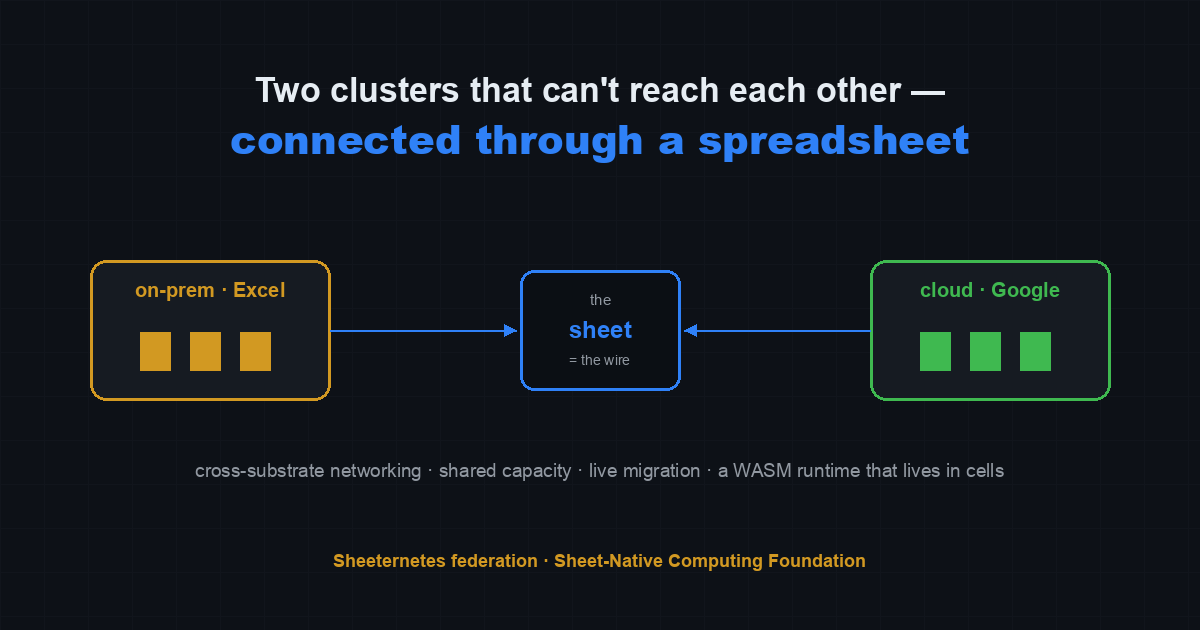
New here? Sheeternetes is a container orchestrator whose control plane lives inside a spreadsheet: Deployments, Nodes, Pods are tabs, a scheduler reads and writes cells, and real Docker containers run on the nodes. It’s part of the Sheet-Native Computing Foundation (SNCF), a working parody of the CNCF where the whole stack lives in spreadsheets. sncfoundation.github.io · github.com/sncfoundation
The problem: reachability, not discovery
Federating two clusters is usually framed as a discovery problem — teach cluster A about cluster B’s services. That part is easy. The hard part is reachability. An on-prem cluster sits behind NAT and can’t be dialed inbound; a serverless Google Sheets cluster has no inbound endpoint at all. You can publish a service catalog all day, but if a pod in A can’t open a socket to a pod in B, you don’t have a federated cluster — you have two clusters with a shared address book.
The usual answer is a tunnel (WireGuard, an overlay), but a tunnel needs at least one side reachable, or a relay both sides can dial. Both our sides are behind NAT. What they do share is that both can reach one ordinary thing over plain outbound HTTPS: a Google Sheet. So the transit medium becomes the sheet itself.
Sheetwire: a spreadsheet as the wire
sheetwire.py is a userspace TCP relay whose transport is
a shared sheet. It has two roles:
serveruns next to the service. It watches the sheet for connection requests, dials the local target, and streams the response back into cells.exposeruns where you want to reach the service. It opens a local listening port; anything you send is framed into the sheet, addressed to the peer.
# side B — hosts the service
sheetwire.py serve  --wire <shared-sheet-id> --service web --target 127.0.0.1:8080

# side A — wants to reach it
sheetwire.py expose --wire <shared-sheet-id> --service web --listen 127.0.0.1:9080

# on side A:
curl localhost:9080     # reaches side B's service through the cells
The transport is one append-only tab, Wire, one row per
frame:
conn | kind (open | data | close) | dir (a2b | b2a) | service | payload (base64)Each accepted TCP connection gets a random conn id, so
many connections multiplex over the same tab. The lifecycle is minimal:
an open frame names the target service; data
frames carry base64 bytes in one direction (a2b) or the
other (b2a); a close frame ends the stream.
Payloads larger than the safe cell size are sharded across several
data frames in order. Reassembly is just concatenation by
row order.
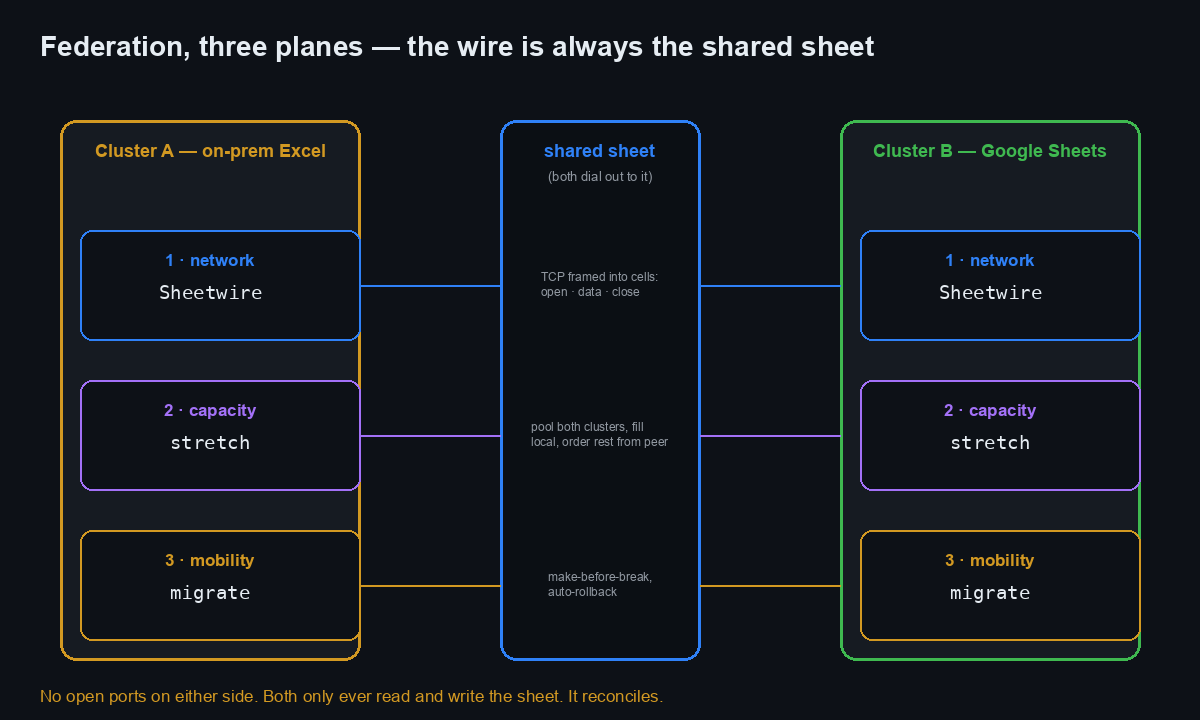
Both sides run the same loop: poll for new rows addressed to me (advancing a cursor so each row is read once), apply them to the local sockets, then flush my own outbound frames. Because everything is outbound-only writes and reads against the sheet, the relay traverses any NAT or firewall — no inbound ports on either side.
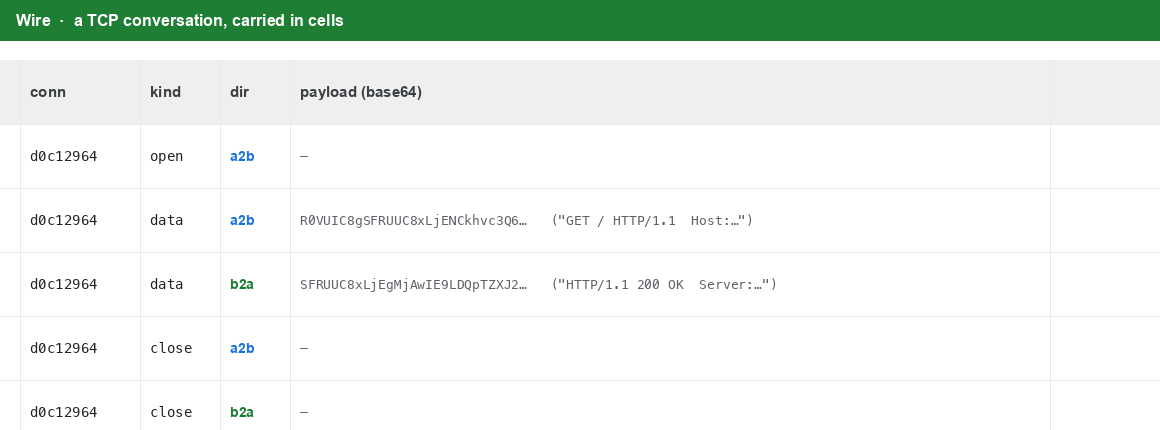
Read the rows and you get the whole exchange as a transcript: the
GET / HTTP/1.1 request in one cell, the
HTTP/1.1 200 OK response in another, the body, the close.
An HTTP round-trip, serialized as spreadsheet rows.
Engineering notes (the parts that bit)
A few things worth writing down, because they’re the non-obvious cost of this design.
A create race on startup. The first run had both
roles start simultaneously and both try to create the Wire
tab; one won, the other got a 400 “a sheet with that name already
exists” and died. The fix is to treat a lost create race as
success:
try:
    ss.batchUpdate(..., {"addSheet": {"properties": {"title": "Wire"}}}).execute()
except HttpError as e:
    if "already exists" not in str(e): raise   # the other side won the create
macOS can’t route to a container’s IP. The first
end-to-end test with a containerized backend refused to connect, with
clean logs — the worst kind of failure. It had nothing to do with
Sheetwire: on macOS the Docker bridge network’s container IPs aren’t
routable from the host. Publish the port (-p) or run the
relay on the same Docker network; on Linux this isn’t an issue. Worth
knowing before you burn an hour on it.
The write quota forces batching. Google Sheets
allows roughly 60 write requests per minute per user. Streaming a frame
per chunk blows through that immediately. So each side accumulates
outbound frames and flushes them once per tick (default ~1.1 s) as a
single values.append — one write regardless of how many
frames — and reads on the same cadence. The consequence is honest:
Sheetwire is a low-throughput, service-to-service pipe (cross-cluster
API calls, control-plane chatter), not a bulk data path. Latency is a
couple of ticks per round-trip.
Two-host validation
Everything above ran on one machine first, which proves the logic but not the premise — a relay you only run beside itself hasn’t crossed anything. So: a laptop on one side, a separate Linux host on the other, a shared sheet as the wire.
Bringing up the second host surfaced its own friction, all mundane
and all worth noting for anyone reproducing: the box wouldn’t
git clone under one agent’s default policy (fixed by
cloning in a plain shell — the repo is public, no auth needed);
pip refused to install into an externally-managed
environment (PEP 668 — use a venv or
--break-system-packages, though the two libs were already
present); and there was no ssh between the machines, so the OAuth
credential had to be moved by hand.
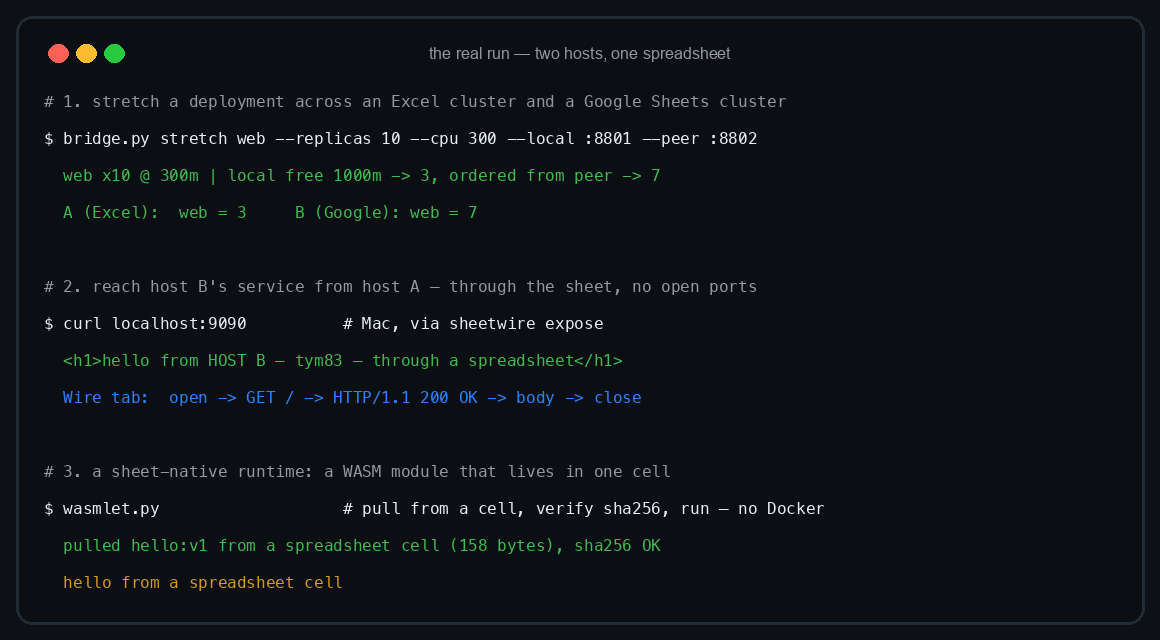
With the backend running on the Linux host and serve
pointed at it, from the laptop:
$ curl localhost:9090
<h1>hello from HOST B — through a spreadsheet</h1>
That HTML was served by a process on the other host. It crossed the
internet once, through a shared sheet, with no inbound ports on either
machine. The full exchange
(open → GET → 200 OK → body → close) is visible as rows in
the Wire tab.
Stretching a cluster: pool the peer’s capacity
With connectivity in place, the next primitive is shared capacity —
let one cluster place work on the other. bridge.py stretch
treats both clusters’ nodes as one pool: it fills the local cluster
first, then orders the remaining replicas from the peer.
python3 bridge.py stretch web --replicas 10 --cpu 300 \
    --local http://localhost:8801 --local-token secret \
    --peer  http://localhost:8802 --peer-token secret
# web x10 @ 300m | local free 1000m -> 3, ordered from peer -> 7
The split is simple and capacity-aware: read each cluster’s free CPU
(node cpu_total − cpu_used over Ready, schedulable nodes),
fit as many replicas locally as the local free CPU allows, and apply the
remainder to the peer as the same-named deployment. Ten replicas, three
fit locally, seven get scheduled on the peer’s nodes. From the outside
it’s one deployment — one web, ten pods — spanning an Excel
file and a Google Sheet, with Sheetwire stitching the Service across
both substrates.
Three planes make one federation, and the transport under each is the same shared sheet:
Live migration across substrates
Moving a workload between clusters live is the oldest piece here, and
it predates the networking work. bridge migrate uses
make-before-break: it copies the deployment to the target and waits
until it reports Ready there before draining it from the source. If the
target never comes up, the source is left untouched — zero downtime,
nothing lost. With --rollback-window N it keeps watching
the target for N seconds after cutover and, if the replica
count degrades, automatically restores the deployment on the source and
removes it from the target.
python3 bridge.py migrate web --from local --to peer --rollback-window 30 \
    --local http://localhost:8801 --local-token secret \
    --peer  http://localhost:8802 --peer-token secret
A sheet-native runtime: WASM in a cell
Docker is only the executor on the node; the image itself already lives in cells via SICF (our on-sheet image format). The natural next step is a runtime that needs nothing but the bytes — and that’s WASM/WASI. A WebAssembly module is small enough to fit whole inside a single cell (base64 + sha256), and a WASI runtime runs it with no Docker daemon and no registry.
wasmlet.py pulls a module out of a cell, verifies its
digest, and runs it with wasmtime:
wasmlet.py --store <sheet-id> --name hello:v1
# pulled hello:v1 from a spreadsheet cell (158 bytes), sha256 OK
# hello from a spreadsheet cell
A 158-byte module, one cell, executed with the digest checked against
the stored value — no daemon, no pull, no external dependency. It’s the
runtime counterpart to SICF: the image is in the sheet, and this
executes straight from it. For the workloads this actually suits —
static binaries, scratch/alpine-scale things,
WASM modules — it’s a genuinely lighter path than the OCI/Docker one,
which stays for heavier images.
Honest limits
- Throughput. The Sheets write quota caps Sheetwire at low bandwidth. It’s for service-to-service calls, not bulk transfer.
- Consistency. Federation is eventually-consistent;
there’s no consensus across the two substrates.
syncis a union reconcile,stretchis a one-shot split — neither coordinates a global view. - Validation scope. The networking is proven across
two physical hosts.
stretchandmigratehave been run against real, live clusters (a real Excel apiserver and a real Google Sheets apiserver) but on a single machine; a full multi-host production run is the next validation.
Do not run production on any of this. It’s a parody foundation with real code underneath, and this is the real code.
Reproduce it
Everything is in one repo, and the README walks it end to end:
- Repo: github.com/sncfoundation/sheeternetes-onprem
- Docs: the Cross-substrate networking (Sheetwire), Stretching a cluster, and sheet-native runtime sections of the README
- Code:
sheetwire.py(the relay),bridge.py(status/stretch/migrate/sync),wasmlet.py(the WASM runtime) - The image standard it plugs into: SICF — the Sheet Container Initiative
- Community — Slack sheetncf, Telegram t.me/stncf, LinkedIn company/sheetncf
Requirements: Python 3 with google-api-python-client +
google-auth, a Google OAuth authorized-user JSON, and
wasmtime on PATH for the runtime bit. The only
network requirement is outbound HTTPS to Google on both sides — no
inbound ports.
It reconciles.